You just bought an embroidery machine, and now every digitizing program you find costs more than the machine did. Hatch Digitizer runs $1,199. Wilcom EmbroideryStudio costs even more. So can you make your own designs without spending a cent?
Yes, you can. A few free tools let you digitize real designs, and a few more let you edit, letter, and convert files. This guide shows which one does what, where each free tool falls short, and when a free tool stops making sense.
What Is the Best Free Embroidery Digitizing Software?
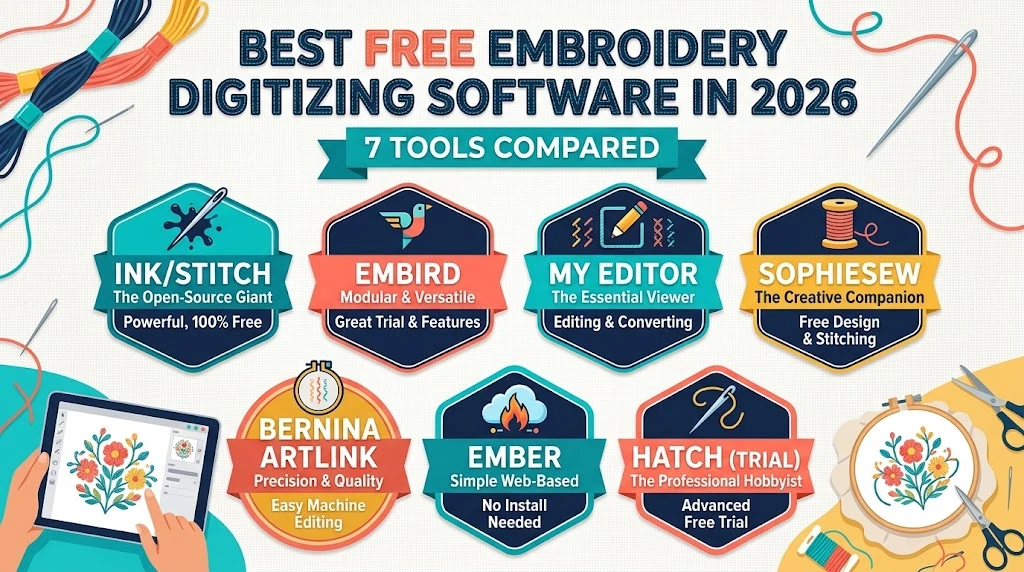
Ink/Stitch is the best free embroidery digitizing software. It is fully free and open source, runs inside the free Inkscape drawing program on Windows, Mac, and Linux, and lets you create satin, fill, and running stitches, then export to PES, DST, JEF, and other formats. For a free trial of paid software, Hatch Embroidery gives you 30 days. For free lettering only, use Embrilliance Express. For free viewing and file conversion, use My Editor or Wilcom TrueSizer.
Free Digitizing vs Free Editing: Know the Difference
Many "free embroidery software" lists mix two very different kinds of tools.
Digitizing software creates a new stitch file from artwork. You decide where every stitch goes.
Editing and converting software opens a file that already exists. You can resize it, change colors, merge designs, or save it in another format, but you can't create stitches from a picture.
Only two free programs truly digitize: Ink/Stitch and the retired SophieSew. Everything else on this list either edits, converts, letters, or runs as a time limited trial.
The Best Free Embroidery Software in 2026
1. Ink/Stitch: Best Free Digitizing Software Overall
Ink/Stitch is an open source project built on Inkscape, a free vector drawing program. You draw or import artwork in Inkscape, then Ink/Stitch turns the shapes into stitches. Version 3.3.0 came out in July 2026, so the project gets regular updates.
What it does:
- Creates satin, fill, running, and many specialty stitch types
- Includes a lettering tool with ready to use fonts
- Shows a stitch simulation before you sew
- Optimizes stitch paths to cut down on jumps
- Exports PES, DST, JEF, EXP, and other formats
- Has a user manual, tutorials, sample files, and an active forum
Where it falls short: You need to learn Inkscape first, and there is no customer support line. Expect a learning curve of a few weeks before your logos sew clean.
Best for: Beginners and hobbyists who want real digitizing tools without paying.
2. Hatch Embroidery Free Trial: Best Free Trial of Professional Software
Hatch gives you 30 days to use the full program for free. You can export up to 30 stitch files during the trial. After that, Hatch Digitizer costs USD $1,199, or $99 a month through FlexPay.
What it does: Manual and auto digitizing, lettering, editing, and export to many machine formats. Hatch comes from Wilcom, the company behind the leading professional software.
Where it falls short: It's free for only 30 days, and the trial won't run on a virtual machine.
Best for: Anyone deciding whether to buy paid software. Plan your 30 days and digitize real customer designs during the trial.
3. Embrilliance Express: Best Free Lettering Software
Embrilliance Express is a free download for lettering with BX fonts. You type names and words on your keyboard instead of placing each letter file by hand.
Where it falls short: It doesn't digitize artwork. You need paid Embrilliance modules for that.
Best for: Monograms, names on towels, and simple text jobs.
4. My Editor: Best Free Viewer and Converter
My Editor opens most embroidery files, converts formats, changes thread colors, rotates and resizes designs, and prints placement templates. It also shows a stitch simulation.
Where it falls short: It can't create new designs. Read the install prompts carefully, because one option can convert your PES files to its own NGS format.
Best for: Converting a DST file to PES, or checking a design before you sew.
5. Wilcom TrueSizer: Best Free Tool From a Professional Brand
TrueSizer is Wilcom's free tool for viewing, resizing, and converting embroidery files. It shows a stitch player so you can watch how a design sews.
Where it falls short: It does not digitize.
Best for: Shops that receive files from a digitizer and need to resize or convert them.
6. Embird Free Trial: Best Trial for Modular Software
Embird offers a free trial so you can test its editor and digitizing module before you buy. The trial comes with restrictions, and you pay for each module once you decide to keep it.
Best for: Hobbyists who want to test a low cost paid option before buying.
7. SophieSew: Free but Outdated
SophieSew is free manual digitizing software for Windows. Development stopped in 2013, and its official website no longer exists, so you can only find it on third party download sites.
Where it falls short: It's buggy, it supports few formats, and it gets no updates. Only download software from a source you trust.
Best for: Old Windows computers, when nothing else will run. Most people should choose Ink/Stitch instead.
Free Embroidery Software Comparison
| Software | Cost | Creates new designs | Platform | Best for |
|---|---|---|---|---|
| Ink/Stitch | Free forever | Yes | Windows, Mac, Linux | Free digitizing |
| Hatch trial | Free for 30 days | Yes | Windows, Mac | Testing pro software |
| Embrilliance Express | Free | No (lettering only) | Windows, Mac | Names and monograms |
| My Editor | Free | No | Windows | Viewing and converting |
| Wilcom TrueSizer | Free | No | Varies by version | Resizing and converting |
| Embird trial | Free trial | Yes, with paid module | Windows | Testing a budget option |
| SophieSew | Free | Yes | Windows | Old computers only |
How to Digitize Your First Design in Ink/Stitch
- Install Inkscape, then install Ink/Stitch from the official site.
- Import your logo as an SVG, or trace a PNG with Inkscape's trace tool.
- Set the size in inches or millimeters before you add stitches.
- Pick stitch types. Use satin for borders and text, fill for big areas, and running stitch for thin lines.
- Add underlay in the Ink/Stitch parameters so the fabric stays flat.
- Run the simulator and look for gaps and long jumps.
- Save as PES, DST, or JEF for your machine.
- Test sew on scrap fabric with the right stabilizer.
Our full guide on how to digitize your own embroidery designs covers each step in detail, including density, pull compensation, and common fixes.
Real Example: What Free Software Can and Can't Do
Jenna runs a small Etsy shop and sells baby bibs with names. She uses Embrilliance Express for the names and spends nothing on software.
Then a customer asks for a bib with a cartoon fox. Jenna tries Ink/Stitch. Her first fox takes four hours and puckers on the thin cotton. Her second try sews better, but the fox's eyes blur at 2 inches.
She sends the fox to a professional digitizer, gets a clean file the same day, and keeps using free tools for names. Free tools covered about 80% of her work. The other 20% went to someone with the right skills and software.
When Free Software Isn't Enough
Free tools work well for learning, simple shapes, and lettering. They struggle with:
- Detailed logos with small text under 0.25 inch
- Caps and 3D puff, which need special stitch planning
- Jacket backs with 30,000 or more stitches
- Rush jobs, when you can't afford three test sewouts
- Paid customer orders, where a bad file costs you blanks and reputation
At that point, you have two choices: buy professional software, or hire a digitizer. Most US digitizers charge $10 to $25 for a left chest or cap logo. See our embroidery digitizing cost guide for full pricing, or compare paid options in our guide to the best professional embroidery digitizing software.
Why Many Free Software Users Send Logos to Hola Embroidery
Hola Embroidery digitizes every file by hand, and our quality team checks it before it reaches you. You get:
- Fast delivery in 4 to 12 hours
- Unlimited revisions until the file sews right
- Every major format, including DST, PES, EXP, JEF, HUS, XXX, VP3, EMB, CND, and SEW
- Any artwork accepted, from JPG and PNG to PDF and hand drawn sketches
- 24/7 support by chat and email
- A library of ready to stitch designs for when you need something now
Keep your free tools for names and practice. Send the hard designs to us.
Your Free Software Action Plan
- Download Ink/Stitch and learn on simple shapes first.
- Install Embrilliance Express for names and monograms.
- Keep My Editor or TrueSizer handy for converting files.
- Start the Hatch 30 day trial only when you have real projects lined up.
- Outsource detailed logos, caps, and jacket backs until your skills catch up.
Frequently Asked Questions
What is the best free embroidery digitizing software?
Ink/Stitch is the best free option. It's fully free and open source, it creates real satin, fill, and running stitches, and it exports to PES, DST, JEF, and other formats.
Is there free embroidery digitizing software for Mac?
Yes. Ink/Stitch runs on Mac, Windows, and Linux. Hatch also runs on Mac and offers a 30 day free trial.
Can I convert a JPG to a PES file for free?
Yes, with Ink/Stitch. Import the JPG into Inkscape, trace it into vector shapes, assign stitch types with Ink/Stitch, and save as PES. Simple images work best.
Is Ink/Stitch good enough for professional work?
Ink/Stitch can make clean, sellable designs once you learn it well. Most commercial shops still use Wilcom or Pulse for speed, advanced lettering, and production tools.
What is the best free embroidery lettering software?
Embrilliance Express is the best free tool for lettering. It works with BX fonts so you can type names and words on your keyboard.
Is Hatch embroidery software free?
No. Hatch offers a 30 day free trial with up to 30 stitch file exports. After that, Hatch Digitizer costs USD $1,199, or $99 a month through FlexPay.
What is the best free embroidery file viewer?
My Editor and Wilcom TrueSizer both open, view, resize, and convert embroidery files for free. Neither one creates new designs.
Is SophieSew still safe to use?
SophieSew still works on some Windows computers, but it hasn't been updated since 2013 and has no official website. Only download it from a source you trust, and consider Ink/Stitch instead.
Need a Design Free Software Can't Handle?
Send your logo to Hola Embroidery. We'll digitize it by hand and deliver a clean, machine ready file in 4 to 12 hours, with unlimited revisions. Upload your design and get a quote.